Quick Answer
- To upgrade a car stereo, check whether your dash takes a single-DIN (2-inch tall) or double-DIN (4-inch tall) receiver, then buy the dash kit, wiring harness adapter and antenna adapter made for your vehicle (Crutchfield, 2024).
- Keeping steering wheel controls usually needs a separate adapter, and factory features built into the old radio, such as factory satellite radio or navigation, often stop working after the swap (Crutchfield, 2024).
- Connect the new stereo’s harness to the adapter harness at a table before you touch the car, and never cut the factory radio plug (Crutchfield, 2026).
- Compare continuous (RMS) power, not peak power: a receiver sold as 50 watts x 4 may deliver 22 watts x 4 continuous (Pioneer DEH-1800UB manual).
- Test every function before you reassemble the dash, then reset the new receiver and set its EQ and crossover.
How to upgrade car stereo sound and features usually comes down to one job: replacing the factory radio (the head unit) with an aftermarket receiver that adds Apple CarPlay, Android Auto, Bluetooth and better sound controls. This guide covers choosing the right receiver, the parts you need and each installation step. If your plan also includes new speakers, an amplifier or a subwoofer, see our full guide on how to upgrade a car audio system.
What Upgrading a Car Stereo Gets You
A new car stereo gives you modern features and cleaner power for your speakers. Crutchfield lists Bluetooth, USB and aux inputs, touchscreen controls, navigation and satellite radio compatibility as common features of new receivers, and many support Apple CarPlay and Android Auto (Crutchfield, 2024).
Sound improves too. Aftermarket receivers usually have a more powerful built-in amplifier and better sound-shaping controls than factory radios (Crutchfield, 2024). Typical examples are a multi-band equalizer, high-pass and low-pass filters, and preamp outputs for adding amplifiers later.
A new receiver will not turn a basic system into a bass-heavy one on its own. For deep bass, Crutchfield recommends adding a subwoofer with its own amplifier (Crutchfield, 2024). If you want better sound without replacing anything, start with our guide on getting the most out of your stereo.
Step 1: Check What Fits Your Dash
Start by finding out what size of receiver your dash takes. Aftermarket stereos come in two standard sizes: single-DIN, which is 2 inches tall, and double-DIN, which is 4 inches tall (Crutchfield, 2024). Most touchscreen receivers are double-DIN, although some “floating screen” models fit a single-DIN opening with the screen mounted in front of the dash.
Use a vehicle fit tool on a car audio retailer’s website, or measure the opening once the factory radio is out. Also check for these common problems:
- The factory radio is built into the climate controls or a large screen, which may need an integration kit instead of a simple dash kit.
- The car has a factory amplifier, which may need a special interface to keep the sound working.
- Warning chimes, parking sensor tones or vehicle settings run through the factory radio.
Step 2: Choose the Receiver and Features
Choose a receiver based on how you use the car, then check its power and outputs. The most requested features are Apple CarPlay and Android Auto, Bluetooth hands-free calling, USB playback and a backup camera input.
Look at the power figure carefully. Pioneer’s DEH-1800UB lists a maximum output of 50 watts x 4 channels, but its continuous power is 22 watts x 4 channels (Pioneer DEH-1800UB manual). The continuous figure, often labeled RMS, is the one that tells you how loud and clean the receiver will play.
If you plan to add amplifiers, pick a receiver with at least two pairs of preamp outputs (front and rear or subwoofer), so each amplifier gets a clean signal. For a full list of options by brand, see our roundup of the best Kenwood car stereo models. For Toyota trucks, our best aftermarket stereo for Toyota Tacoma guide covers dash kits and integration by generation.
Step 3: Buy the Installation Parts
Most car stereo upgrades need four parts made for your exact vehicle, plus a few basic tools.
| Part | What it does |
|---|---|
| Dash kit | Fills the gap around the new receiver and holds it in place |
| Wiring harness adapter | Connects the new stereo to the factory radio plug without cutting wires |
| Antenna adapter | Fits the factory antenna plug to the new receiver’s antenna input |
| Steering wheel control adapter | Keeps your steering wheel audio buttons working |
Crutchfield notes that keeping steering wheel controls usually requires a special adapter, and that factory features such as satellite radio, navigation and Bluetooth often do not carry over, because they are built into the factory radio or use proprietary connections (Crutchfield, 2024).
For tools, you need a couple of screwdrivers, a wrench or socket for the battery terminal, wire strippers, electrical tape and a way to join wires, plus a plastic panel removal tool so you do not scratch the dash (Crutchfield, 2026).
Step 4: Prepare the Wiring Harness at a Table
Join the new stereo’s wiring harness to the vehicle adapter harness at a table before you go to the car. It is easier to strip, crimp or solder wires under good light than under the dash.
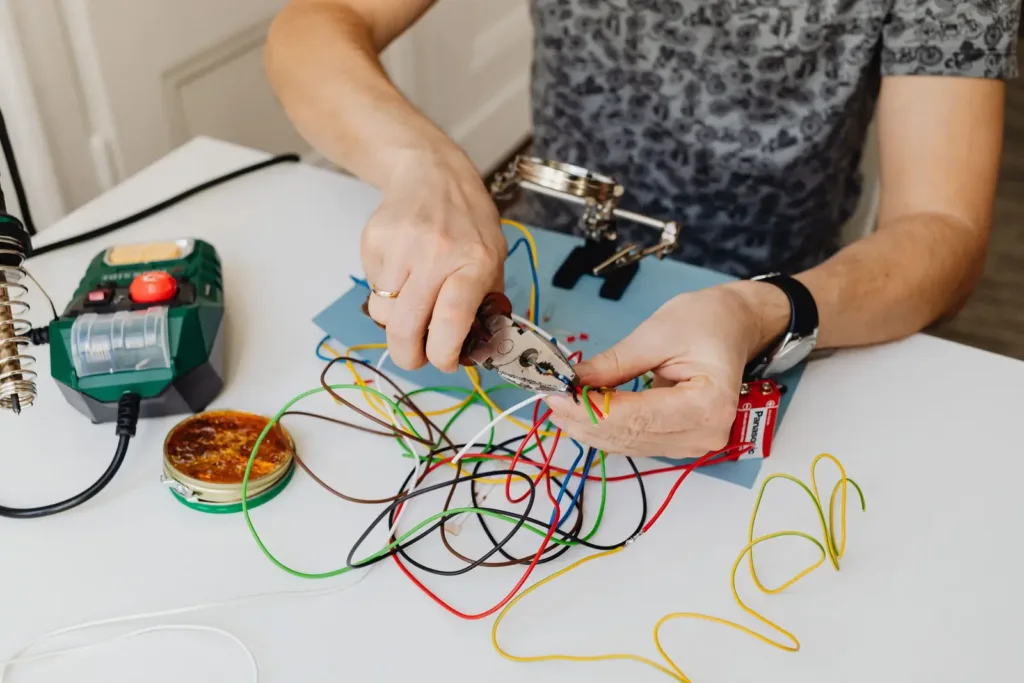
Match the wires by color and function. Aftermarket stereos follow a standard color code: yellow for constant 12-volt power, red for switched (accessory) power, black for ground, blue/white for the amplifier remote turn-on, and white, gray, green and purple pairs for the four speakers, with the striped wire in each pair as the negative. Always check both the stereo manual and the adapter’s color diagram before you connect anything (Crutchfield, 2026).
Use crimp connectors or solder with heat-shrink tubing for each joint, and never twist wires together with tape alone. Do not cut the factory radio plug: Crutchfield says using the factory connector is the way to install a new stereo without damaging the car’s electronics, especially in modern vehicles (Crutchfield, 2026).
Step 5: Remove the Factory Radio
Disconnect the negative battery terminal first, so you cannot short a wire or trigger a warning light. Then remove the trim around the radio with a plastic panel tool, take out the screws or bolts that hold the radio, and slide it out.
Unplug the factory harness and antenna cable from the back of the old radio. Take a photo of the connectors before you unplug them, and keep the old radio in case you sell the car later.
Step 6: Connect and Test the New Stereo
Connect the prepared harness to the factory plug, then connect the antenna adapter and any steering wheel control or camera cables. Reconnect the battery and test everything before you screw anything into the dash.
Check this list with the receiver resting in the opening:
- The receiver turns on and off with the key.
- Each speaker plays, using the balance and fader controls to test them one at a time.
- AM and FM radio pull in stations clearly.
- Bluetooth pairs and USB plays.
- Steering wheel buttons work, if you installed that adapter.
- The receiver keeps its settings after you switch the car off and on again.
If something does not work, it is much easier to fix now. Our guide on how to test a car stereo walks through power, ground and speaker checks with a multimeter.
Step 7: Mount the Receiver and Reassemble the Dash
Mount the receiver in the dash kit, tuck the wiring behind it so nothing is pinched, and slide the assembly into the dash until it locks or bolts in. Then refit the trim panels in reverse order.
Before you start using it, reset the receiver’s processor. Pioneer’s manual tells owners to reset the microprocessor before using the unit for the first time after installation (Pioneer DEH-X8800BHS manual). Our guide on how to reset a car radio covers reset buttons and menu resets.
Step 8: Set Up the New Stereo for Best Sound
Set the sound controls once the dash is back together. Turn off bass boost and loudness, set the EQ flat, and adjust from there with music you know well.
If the receiver has a high-pass filter and you run factory door speakers, set it around 80 Hz to keep deep bass away from them; this lets the speakers play louder without distortion. If you add an amplifier later, our guide on choosing an amplifier for car speakers explains how to match power.
Other Ways to Upgrade a Car Stereo Without Replacing It
If your factory radio cannot be replaced, you can still upgrade the car stereo around it. This is common in newer cars where the screen controls climate, safety and vehicle settings.
- Add a Bluetooth or CarPlay adapter that connects through the factory USB port or aux input.
- Add a line output converter and an amplifier to power better speakers from the factory radio.
- Add a digital signal processor (DSP) to correct the factory tuning; see our guide on installing DSP in car audio.
DIY or Professional Installation?
A basic receiver swap is a reasonable first DIY project if you have the vehicle-specific parts and a free afternoon. Choose a professional installer if the car has a factory amplifier, a radio built into the climate controls, or a data-bus system that controls chimes and vehicle settings, because these need interfaces that must be set up correctly.
If your current stereo has a fault rather than missing features, you may not need to replace it. Check our guide on how to fix car stereo problems first. For more on the parts listed above, the Crutchfield car stereo FAQ and its wiring harness guide are useful references.
Frequently Asked Questions About Upgrading a Car Stereo
Can I upgrade my car stereo myself?
Yes, in most older and mid-range cars. With a vehicle-specific dash kit, wiring harness adapter and antenna adapter, a receiver swap needs only basic hand tools. Cars with factory amplifiers or radios built into the climate controls are better left to a professional.
Will a new car stereo improve sound quality?
Usually, yes. Aftermarket receivers have cleaner built-in power and more sound controls than most factory radios. The biggest jump in sound quality still comes from upgrading the speakers and adding an amplifier.
Do I need a wiring harness to upgrade my car stereo?
Yes. A wiring harness adapter plugs into the factory radio connector, so you do not have to cut the car’s wiring. It also makes it easy to reinstall the factory radio later.
Will my steering wheel controls work with a new stereo?
They can, but most cars need a steering wheel control adapter wired between the car and the new receiver (Crutchfield, 2024). Check that the receiver supports it before you buy.
What is the difference between single-DIN and double-DIN?
Single-DIN receivers are 2 inches tall and double-DIN receivers are 4 inches tall (Crutchfield, 2024). Both share the standard width of about 7 inches (180 mm). Double-DIN openings fit the large touchscreen models.
Can I add Apple CarPlay without replacing my stereo?
Sometimes. If your car has a factory screen, an aftermarket interface or adapter may add CarPlay or Android Auto. Otherwise, the most reliable way is a new receiver with CarPlay built in.
Summary: How to Upgrade Car Stereo
- Check the dash size (single-DIN or double-DIN) and any factory features tied to the radio.
- Choose a receiver by features and continuous (RMS) power, with preamp outputs if you plan to add amplifiers.
- Buy the dash kit, wiring harness adapter, antenna adapter and steering wheel control adapter for your car.
- Wire the harness at a table, test every function before reassembly, then reset and tune the new stereo.